Your operation will never again fail without anyone knowing.

Orchestration, governance and intelligence for your IT and data operations — in a single pane.

Single pane of glass Governance built in SQL · Shell · Python Multi-database
The starting point

How many critical routines are running in your company right now?

And the question that really stings: who can tell you, in thirty seconds, whether every one of them succeeded today?

In most companies the answer is on no dashboard. It lives in the heads of two or three people — and in an email that arrives after the customer has already complained.

?

Nobody has the exact number

Routines were born on different servers, in different years, written by people who may no longer work here.

!

You find out about the failure through the damage

Billing did not close, stock came out wrong, the board's report is blank. The alert is the customer.

The real problem

Fragmentation is the biggest enemy of efficiency

Isolated scripts, native schedulers scattered across dozens of servers and no visibility create blind spots that produce silent failures e security risks.

Scattered schedulers

Every server with its own scheduler. No consolidated view, no reliable inventory.

Passwords in the script

Credentials in plain text inside files that anyone with server access can read.

Changes with no trail

Someone changed it, told no one, documented nothing — and there is no way back to the version that worked.

Knowledge in one person

If that person goes on holiday, the company goes blind. If they leave, it goes mute.

It is not a lack of technical skill. It is the lack of a platform that treats automation as the business-critical asset it is.

The proposal

A single pane for everything that runs in your business

NexaOrch is an agnostic, multi-platform automation engine that turns complex data, infrastructure and integration routines into visual, auditable and resilient workflows.

  • Every routine in the company in a single inventory
  • Who created it, who changed it, who ran it and what happened
  • A failure emails whoever you choose, the moment it happens
  • Credentials in an encrypted vault, away from the scripts
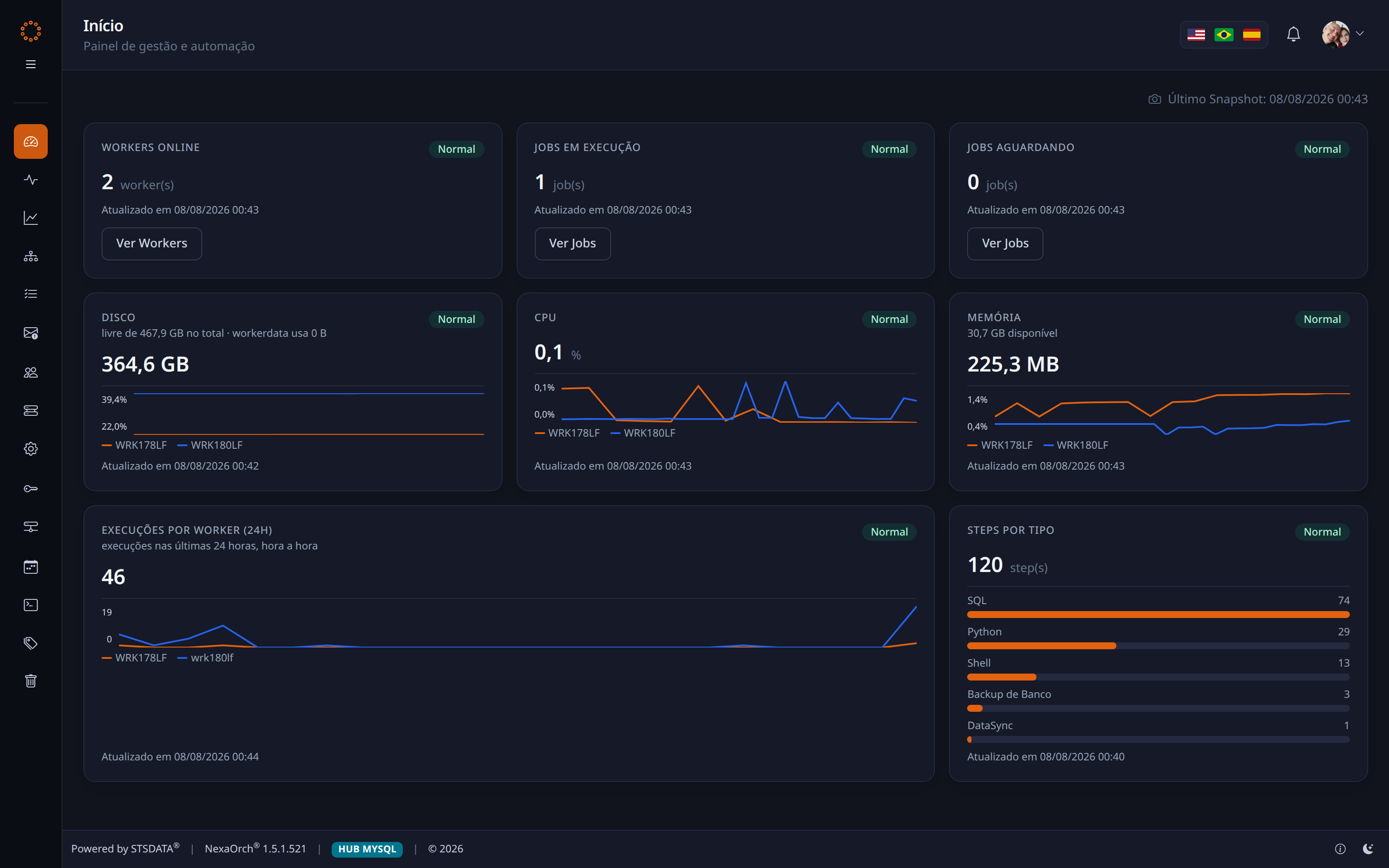
https://nexaorch.suaempresa.com.br/
NexaOrch Home dashboard
assets/screens/02-inicio.webpScreenshot pending
Four pillars of value

What changes in practice

🛡

Governance and compliance

An end to undocumented changes. Change requests with approval, version control with check-out, and a credential vault with access profiles.

📊

Visibility and analytics

Stop reacting to failures and start anticipating them: run-time trends, success rates and infrastructure health in real time.

Scalable architecture

Distributed automation agents: heavy processes run right at the edge, and capacity grows by adding servers — with nothing rewritten.

🧩

Reuse

Centralised command and schedule libraries. Update a business rule in one place and it reaches every process that uses it.

Pillar 1 · Governance

No change reaches production without approval

Whoever builds it asks. Whoever answers for the operation approves. The platform records everything and keeps the full history.

  • Change requests as the formal channel — with an activity history and notifications for everyone involved
  • Version control with check-out: one person edits at a time, and any previous version can be restored
  • An explicit lifecycle: Draft → Test → Production, with a dedicated promote action
  • Five access profiles — from administrator to read-only, with per-process permissions
  • A recycle bin with retention: deletion is never irreversible by accident
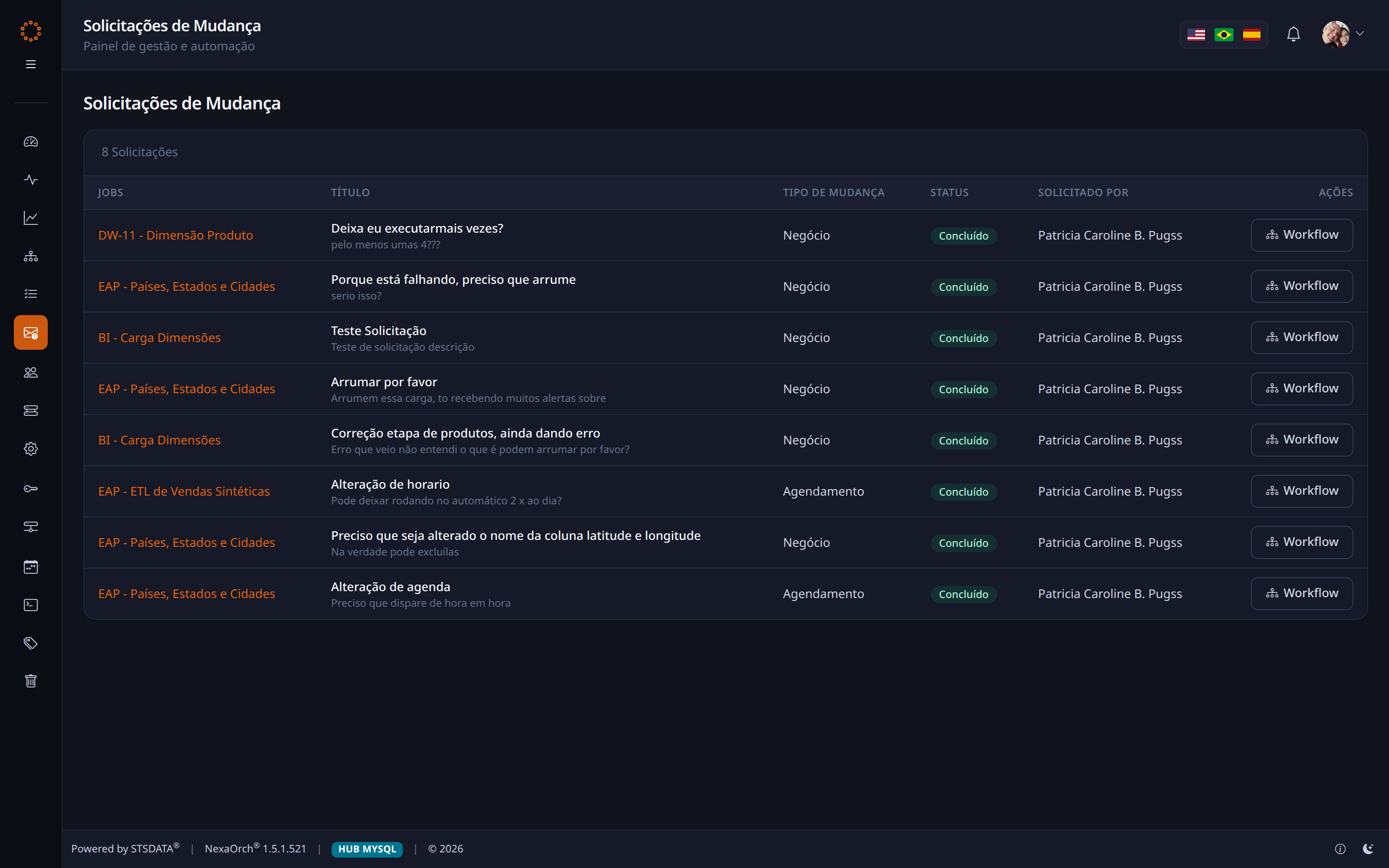
/Jobs/ChangeRequests
Change requests
assets/screens/10-change-requests.webpScreenshot pending
Pillar 2 · Visibility

Three dashboards, three different questions

Home

“Is the platform healthy?” — agents online, processes running, CPU, memory and disk for every server.

Operations Centre

“What is happening right now?” — the queue, runs in progress, the event feed and the Needs Attention.

📈

Execution Analytics

“How are we doing over time?” — success rate, average duration, volume processed and what got worse.
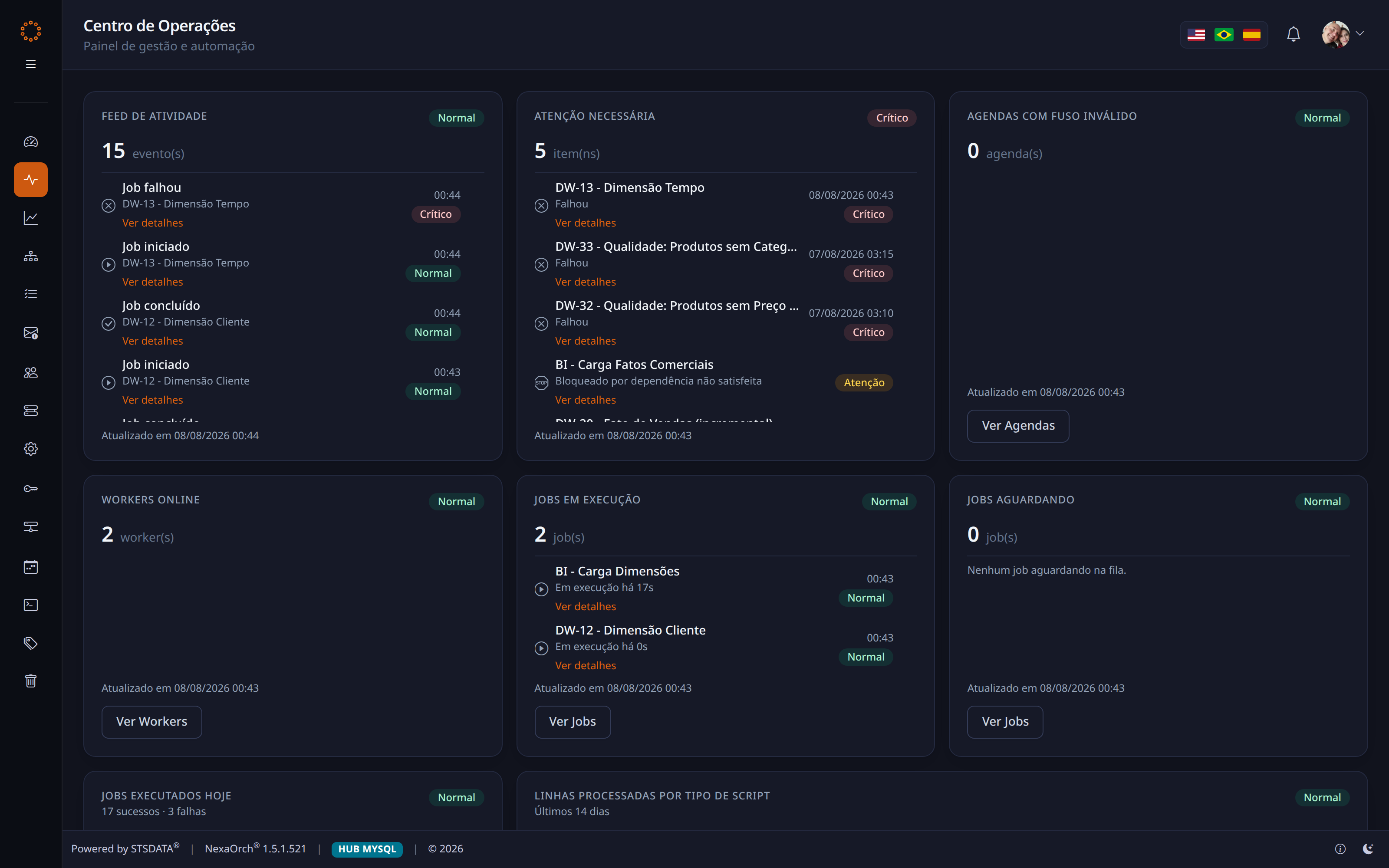
/Dashboard/Operations
Operations Centre
assets/screens/03-operacoes.webpScreenshot pending
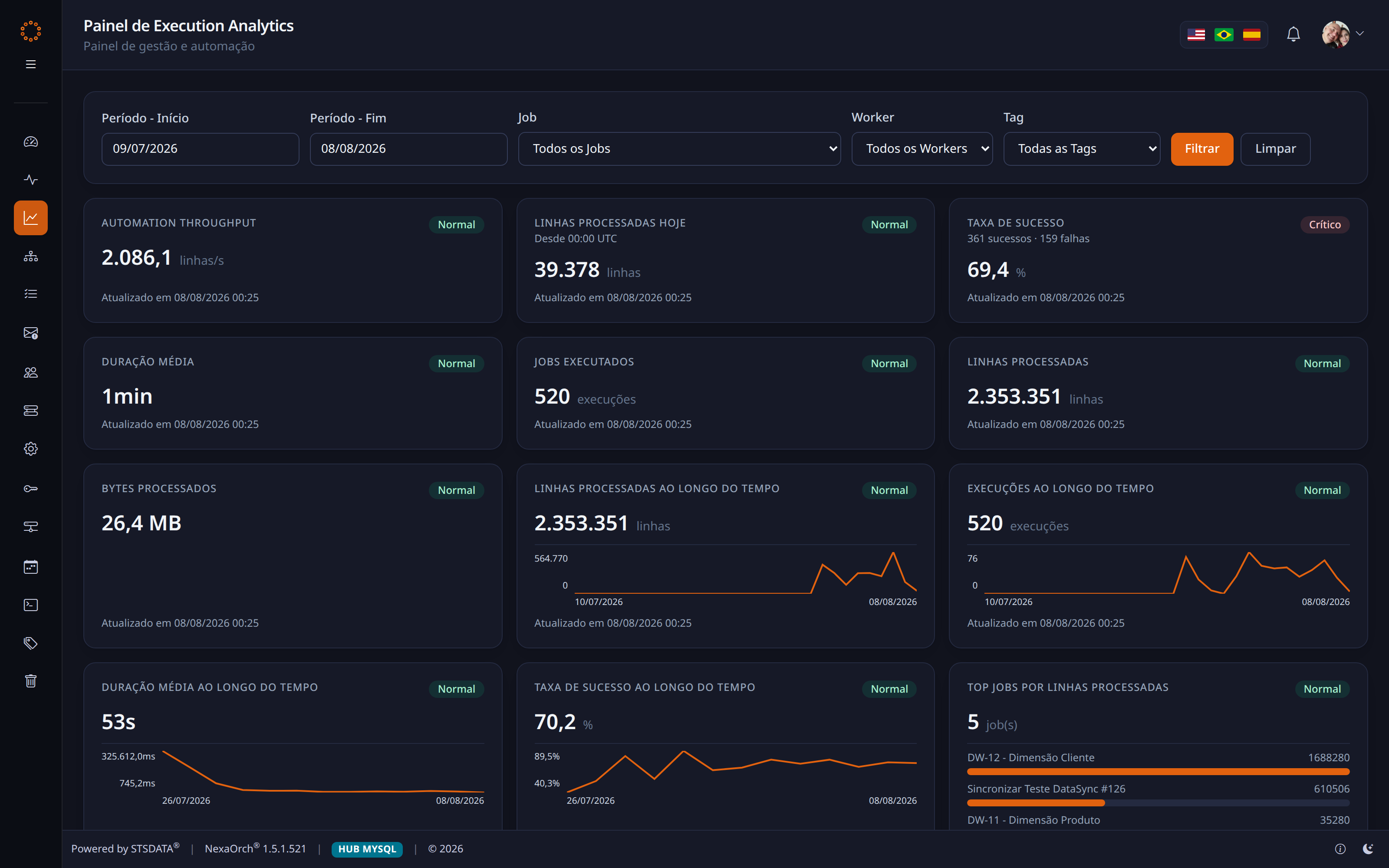
/Dashboard/Analytics
Execution Analytics
📈
assets/screens/04-analytics.webpScreenshot pending
The automation studio

The process drawn out — not hidden in a file

Every process is a sequence of steps with explicit success and failure rules, laid out in a diagram anyone can read.

  • Steps in SQL, Shell/PowerShell/Bash or Python, within the same routine
  • A green path and a red path: what to do when it works and when it does not
  • One step's result feeds the next, including in a loop
  • Automatic retries, configurable per step, before declaring failure
  • An editor with syntax highlighting, and a result preview before publishing
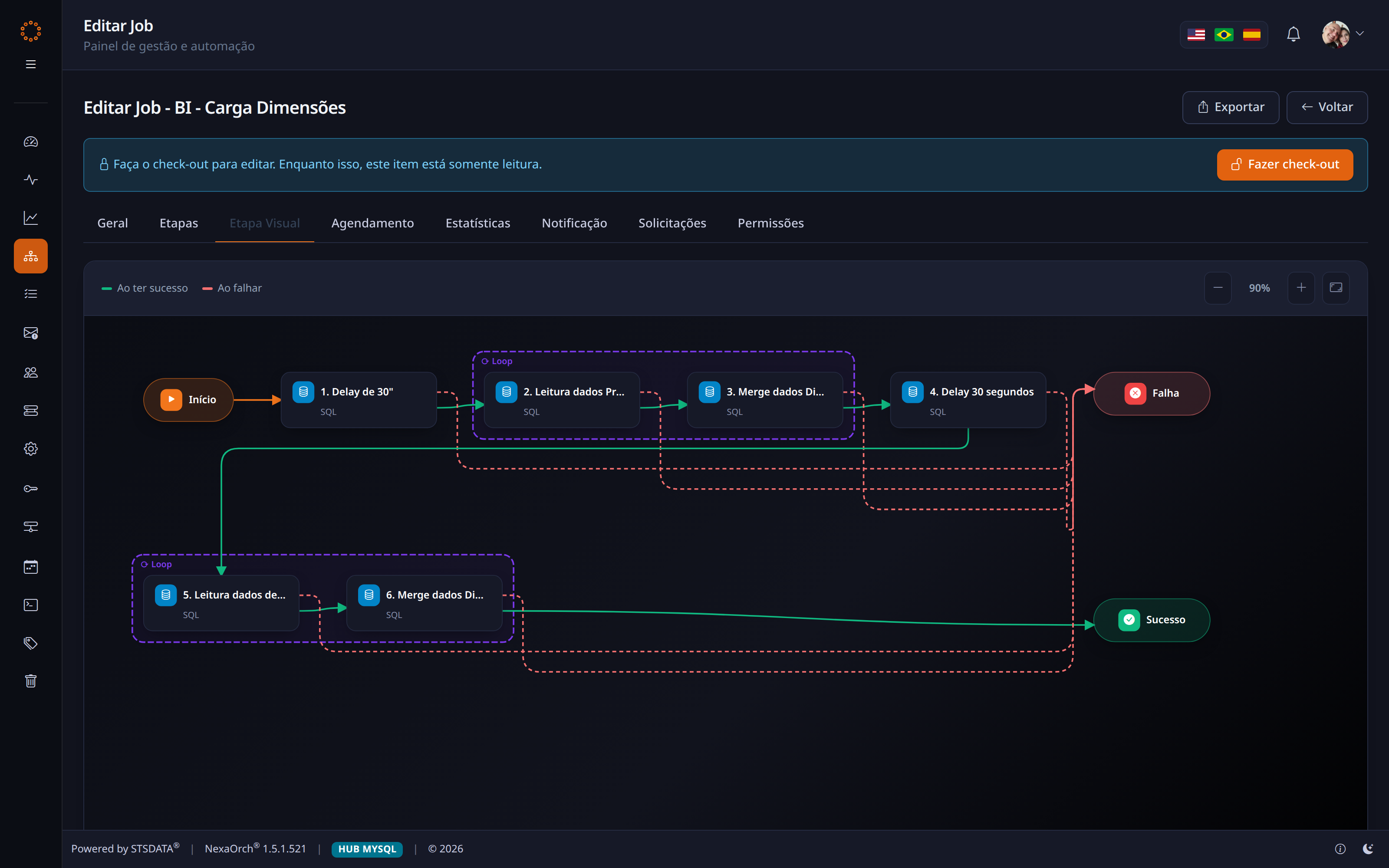
/Jobs/Edit — Visual Step tab
Visual Step diagram
assets/screens/06-visual-step.webpScreenshot pending
Pillar 3 · Scale

Grow by adding a server, not by rewriting a process

The Portal is where everything is configured. The Automation Agents are what execute — and you can have several, on different servers, safely sharing the same queue.

up to 32Concurrent runs per agent, configurable
15minThreshold for detecting an offline agent
30sSchedule-checking cycle
0Duplicate runs — the database arbitrates who executes

If the primary agent goes down, another automatically takes over coordination of the maintenance routines.
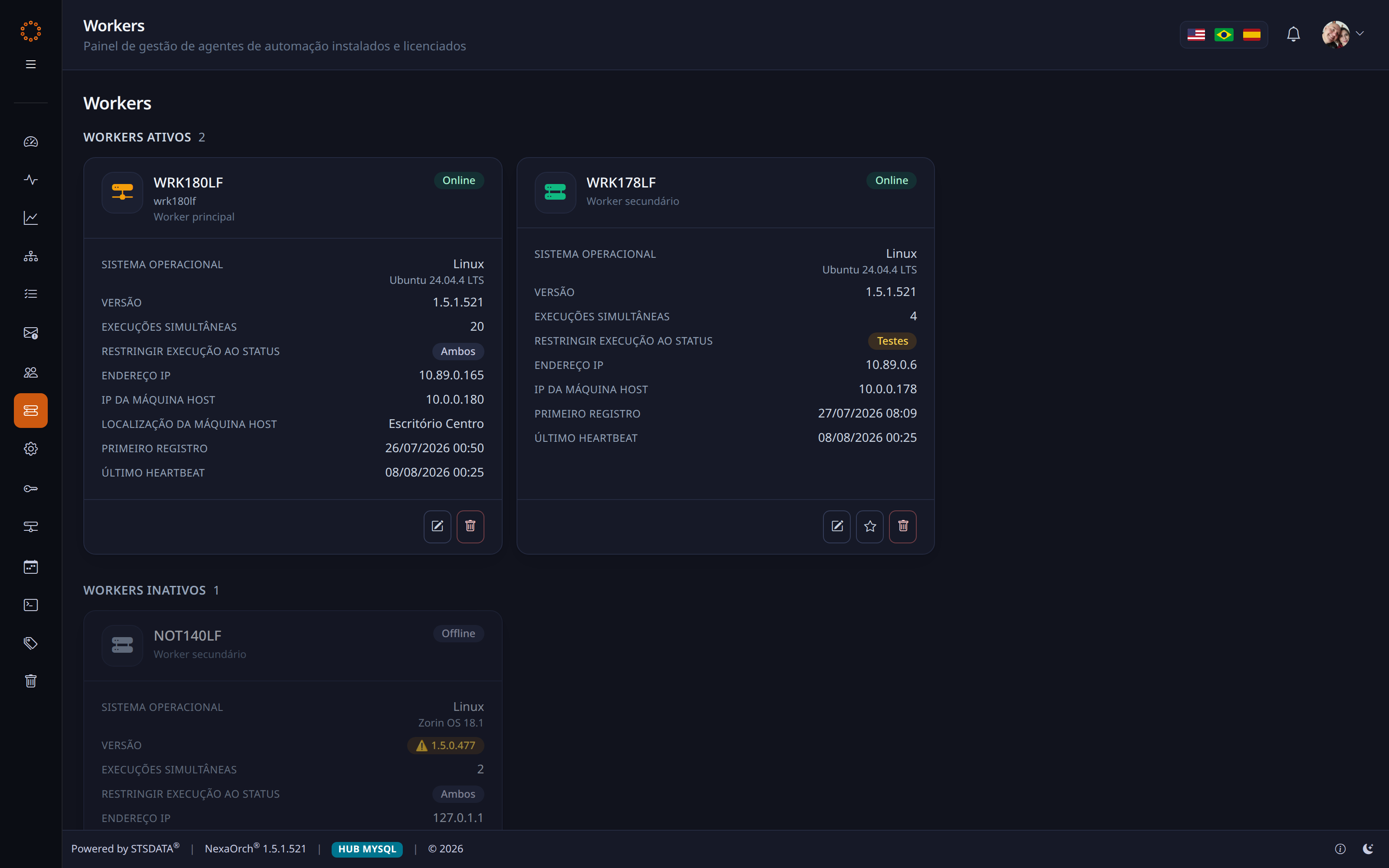
/Workers
Agent inventory
assets/screens/09-workers.webpScreenshot pending
Pillar 1 · Security

Your team uses connections — not passwords

The developer picks “Billing Database”. They never see, never copy and never paste the actual credential.

  • Passwords always encrypted — never in plain text, anywhere
  • Private connections granted by name, and only by the administrator
  • Each script receives only the connections that user could see
  • The log records the name of the connection used — never its value
  • A daily per-person quota on a specific process — lets read-only users run it
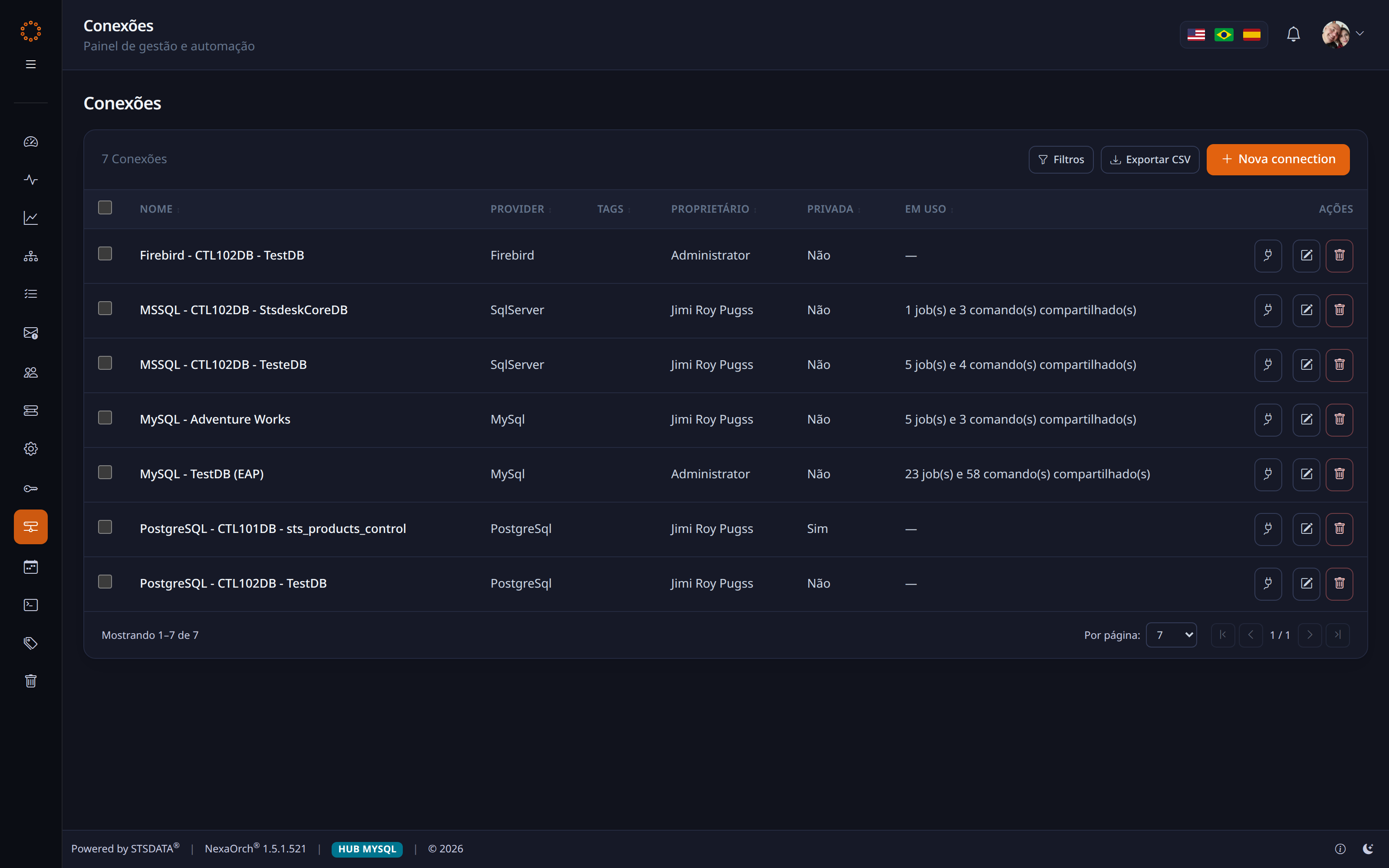
/Connections
Connection manager
🔑
assets/screens/11-connections.webpScreenshot pending
A day in the operation

The same failure, with and without NexaOrch

Today · with no platform
02:10

The overnight load fails in silence.

09:15

The board opens the report and sees the wrong numbers.

09:40

The team goes hunting: which server? which script?

12:30

Reprocessed by hand. Nobody knows why it failed.

With NexaOrch
02:10

A step fails. The configured automatic retry fires.

02:11

An email goes to the address you set, with that step's log.

07:50

The dashboard already shows the process in Needs Attention.

08:05

Fixed in one click. The board never knew.
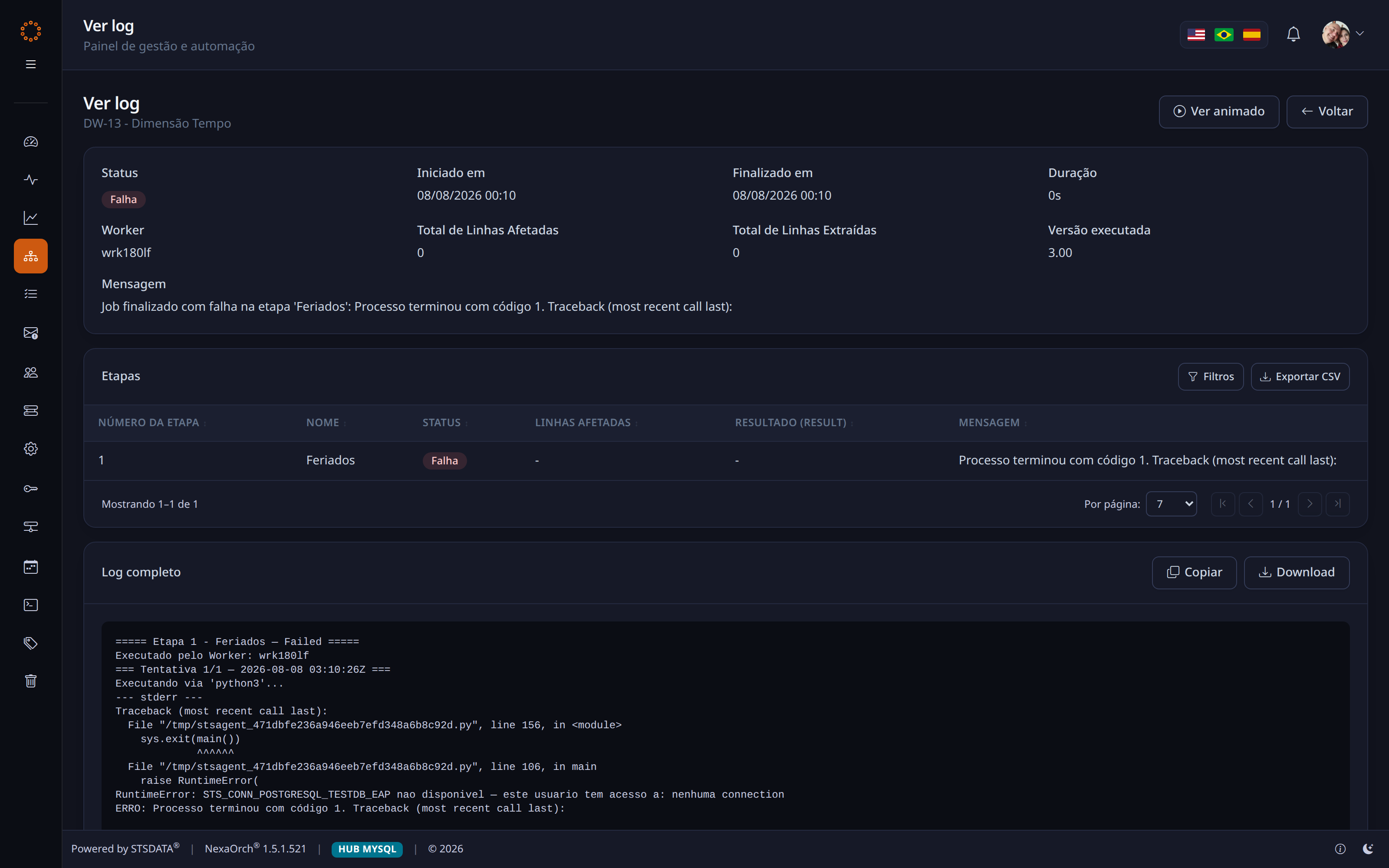
/Jobs/ExecutionLog — the full execution log
Execution log
assets/screens/08-execution-log.webpScreenshot pending
Ecosystem

Thirteen modules, one platform

Everything ships installed. No mandatory add-on, no separate licence per module, and no integration project before you can start.
Automation EngineDashboard EngineExecution Analytics Platform HealthGlobal VariablesNotifications Shared SchedulesShared CommandsConnections Credential VaultUsers and AccessTags Change requests
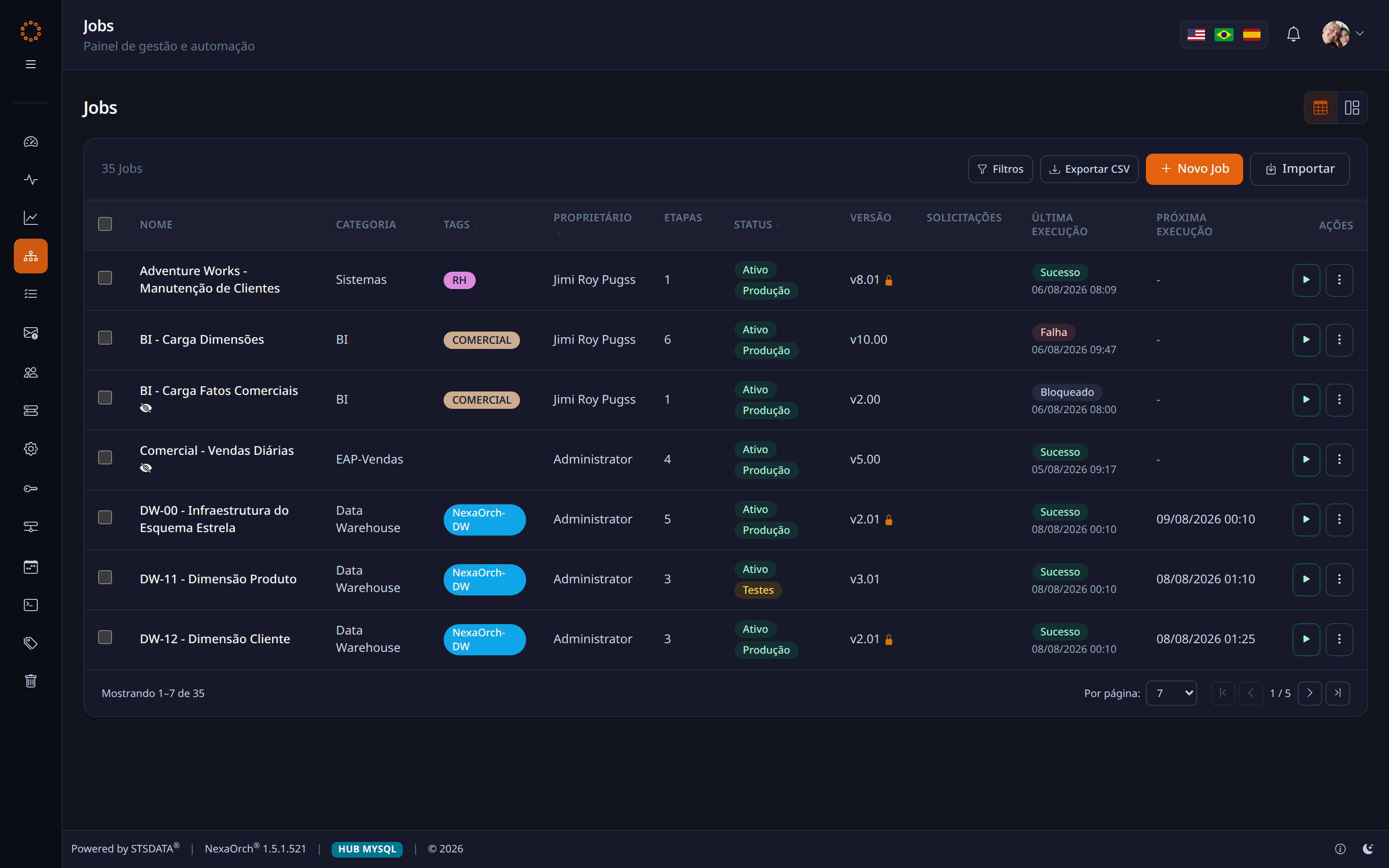
/Jobs
Job listing
assets/screens/05-jobs.webpScreenshot pending
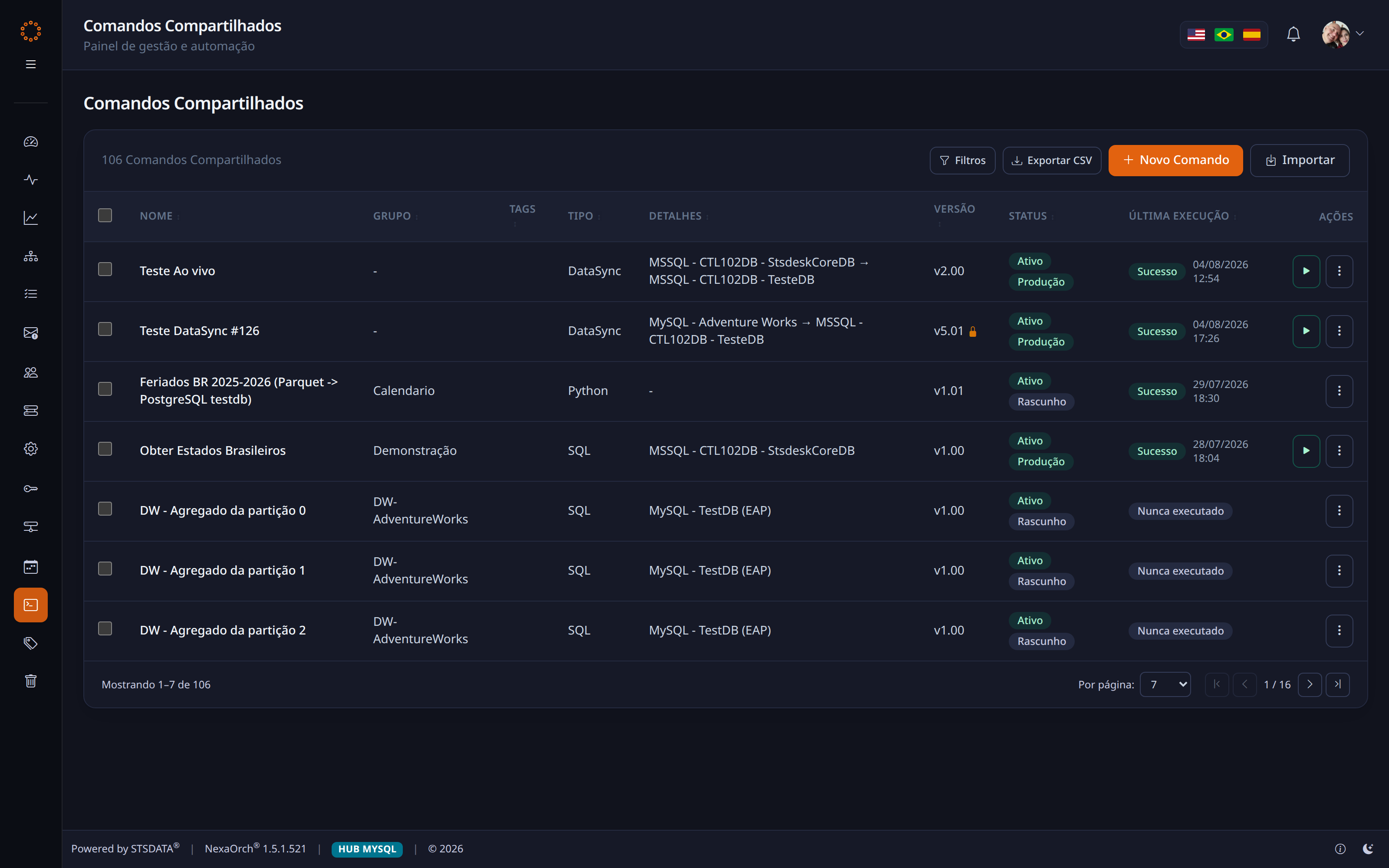
/SharedCommands
Shared Commands
assets/screens/14-shared-commands.webpScreenshot pending

On the product's declared roadmap: Alert Engine, AI Insights, Executive Dashboard and High Availability.

Comparison

Where the other options stop

There are four ways to schedule a routine on the market. None of them delivers the whole set.

Capability Operating-system
scheduler
Native database
scheduler
Orchestrator
code-first
Enterprise batch
suite
NexaOrch
1.5
SQL, Shell and Python in the same routine ~
Supports multiple database vendors ~
A flow with the error path drawn on screen ~~
Built-in credential vault ~~
Versioning with check-out and restore ~~
Formal approval before going to production ~~
Historical analytics and infrastructure health on the same dashboard ~~
Operable by someone who is not a developer ~~
Deployment in hours, not a months-long project ~
Predictable cost, with no per-module charge ~
meets it ~partial, or only with extra development does not meet it

Positioning by solution category, compiled by STSDATA. Capabilities vary by product, version and edition — and the NexaOrch column reflects the 1.5 build you have just seen running.

Product maturity

Not a prototype. A platform at version 1.5

1.5Current version in production
7Databases supported
42Ready-made dashboard widgets
3Interface languages: pt-BR, en-US, es-ES
13Modules installed out of the box
5Access profiles (RBAC)
1.091Automated test cases
1Command to install everything

An interface with light and dark themes, three languages, CSV export on every registry and history listing, and a public downloads page with release notes. The details of a product genuinely used, every day.

Investment

The best value on the market

Enterprise orchestration platforms tend to charge per process, per server and per module — and still demand a months-long deployment project.

  • Every module included, with no add-on charges
  • Deployment in a single command, with no mandatory consultancy
  • Support and roadmap straight from the people who build the product
  • A Brazilian software company, with support in your language

Compare it with any alternative on the market. Our commercial proposal is built to be the best on the table — and it fits in a twenty-minute conversation.

Downtime cost avoided

Every failure you find at 02:11 instead of 09:15 is revenue, SLA and reputation preserved.

Team freed up

Hours spent hunting for scripts become hours spent on projects. Reusing commands removes the rework.

🛡

Risk reduced

Credentials in the vault, changes approved and a full history — what an audit asks for, already there.

Next step

Let us map your critical routines in 20 minutes

A live demo, with your own scenarios. No commitment, no installation and no slide deck.

Book a NexaOrch demo →
STSDATA · Automation and Data [email protected] stsdata.com.br

Building the invisible foundation that keeps your business running.

navegar · O visão geral · F tela cheia · Ctrl+P exportar PDF

Visão geral dos slides